tmux vs a GUI for parallel AI coding agents: an honest comparison
If you run more than two Claude Code sessions at once, you've already made a tooling choice — even if it was "a pile of terminal tabs," which is also a choice, just the worst one. The real decision is between a terminal multiplexer (tmux, or Zellij) and a GUI built for the job. We make one of the GUIs, so read this knowing that — but the honest answer is that tmux wins some of these rounds outright.
Round 1: getting six sessions up — tmux wins on scriptability
In tmux, a fleet is a script:
#!/bin/bash
tmux new-session -d -s fleet -n api
tmux send-keys -t fleet:api 'cd ~/work/api && claude' Enter
for w in web infra docs; do
  tmux new-window -t fleet -n $w
  tmux send-keys -t fleet:$w "cd ~/work/$w && claude" Enter
done
tmux attach -t fleet
Save that, and your entire six-agent layout reproduces in two seconds, forever, on any machine with tmux installed. No GUI matches the portability of a shell script in your dotfiles.
Round 2: knowing which session is which — the GUI wins
This is the round people underestimate until they're four hours in. tmux gives you window names in a status bar — 0:api 1:web 2:infra — which works at three sessions and starts failing around five, because the names tell you where each session is but not what state it's in. Which one is waiting for your approval? Which one finished? You have to visit each window to find out.
A grid GUI shows every session at once, as live tiles:
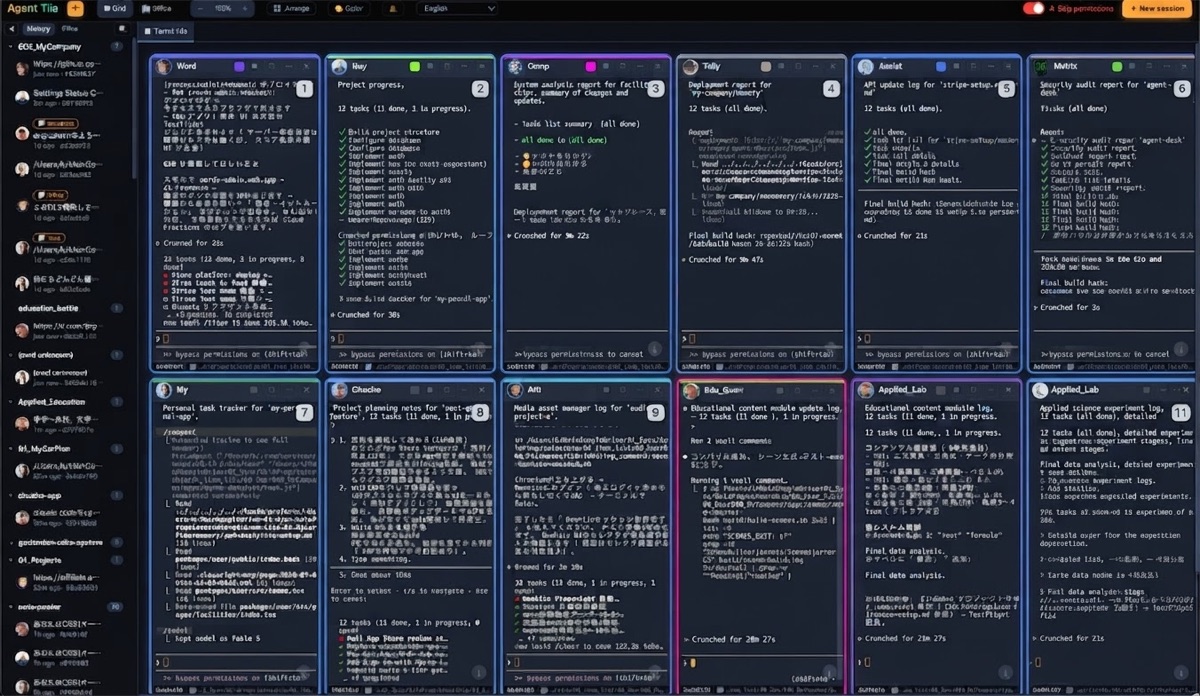
The difference isn't cosmetic. Scanning eight tiles for "which one stopped" takes a second; cycling through eight tmux windows takes a minute and breaks whatever you were thinking about.
Round 3: sending one instruction to many sessions — tie, different flavors
tmux does fan-out with send-keys in a loop (scriptable, precise). GUIs do it with a broadcast box (immediate, visible). We wrote a whole comparison of broadcast approaches — short version: scripts are safer for routine commands, a visible mode is faster for conversation.
Round 4: surviving a crash — depends what crashed
tmux sessions survive a terminal crash beautifully — tmux attach and everything's there. But if the machine reboots, tmux restores panes, not the Claude conversations inside them; you're re-claude --resume-ing by hand, if you remember which directory each window was in. A GUI that tracks session-to-project mapping can rebuild the whole fleet after a reboot, conversations included.
Round 5: cost — tmux wins, barely
tmux is free. Zellij is free. Agent Tile is $10, once, with full source — no subscription. If $10 matters, tmux is genuinely fine; the price of the GUI is one skipped lunch, but the price of tmux is learning it, and your time isn't free either.
The three questions that actually decide it
- How many sessions, really? ≤3: terminal tabs are fine, don't overthink it. 4–6: tmux if you already know it, GUI if you don't. 7+: the visibility problem dominates — grid GUI.
- Do you live in the terminal already? If your muscle memory is vim-and-tmux, adding AI agents to that world costs you nothing. If you'd be learning tmux just for this, that's a weekend you could skip.
- Do you get interrupted? The more you context-switch away and come back, the more the at-a-glance grid pays off. Uninterrupted deep-workers need it less.
Plenty of people should just use tmux. If your answers to the three questions point the other way, that's the case we built for.
The Agent Tile Blog is run by TechAthletes, the maker of Agent Tile.
Get Agent Tile — $10 once, full source included →
Agent TilePractical guides for running many Claude Code sessions in parallel on macOS — orchestration, review workflows, and staying sane with a fleet of AI coding agents.
Get Agent Tile — full source, $10 once →
- IT-QA — Technical Q&A with AI-assisted answers and point bounties — for the questions that come up while you're running a fleet.