The complete macOS setup for a fleet of Claude Code agents (2026)
This is the setup post we wish existed when we started running Claude Code in parallel. It assumes a Mac, an existing Claude Code install, and the ambition to run 4–8 sessions without the whole thing collapsing into chaos by Thursday. Each step links to a deeper dive if you want the reasoning.
Step 1: give every agent its own working copy
Two agents editing one checkout is the classic first failure — agent A runs git checkout, agent B's edits vanish mid-thought. Git worktrees fix it with one repo and N isolated working directories:
cd ~/work/api
git worktree add ../api-feature-auth  -b feature/auth
git worktree add ../api-bugfix-cache  -b bugfix/cache
# each agent gets its own directory, branches share one .git
Full pattern, including cleanup and the gotchas: Git worktrees for AI coding agents.
Step 2: decide how many sessions you'll actually run
More agents ≠ more output. Your review bandwidth is the bottleneck — the fleet produces code faster than you can responsibly read it somewhere around 4–6 sessions for most people. Our take on the real ceiling, but the short version: start at 3, add one at a time, stop when review latency (not agent capacity) becomes your critical path.
Step 3: make sessions visually distinct
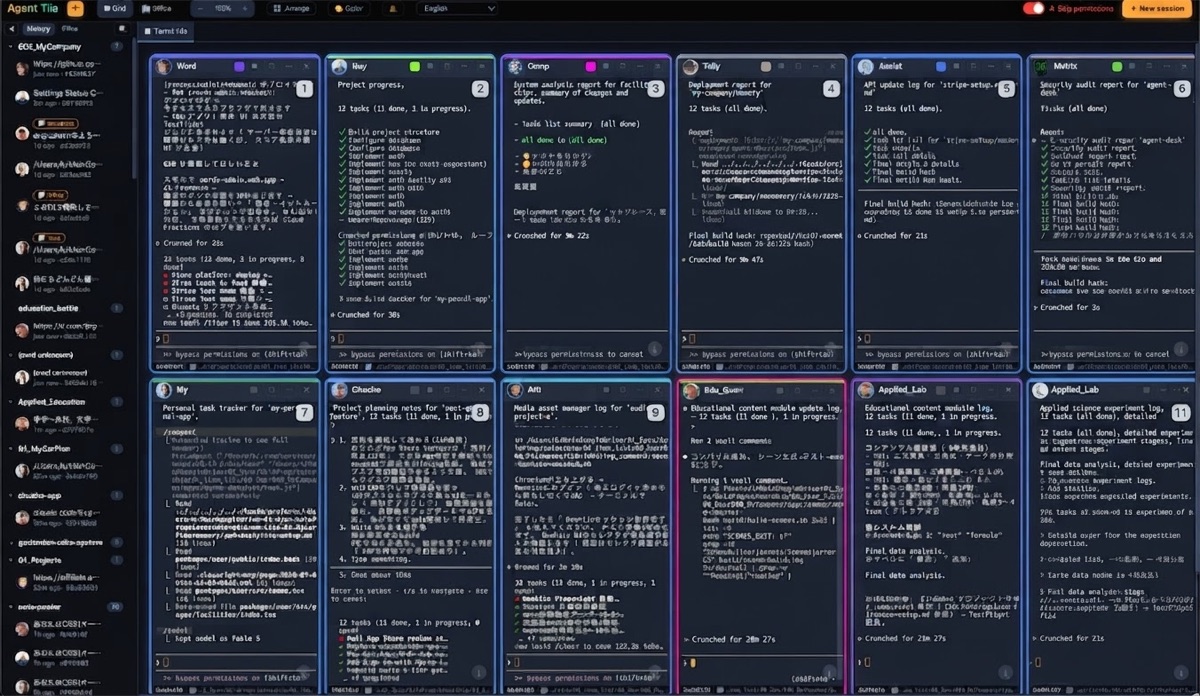
You will, at some point, type an instruction into the wrong window. Reduce the odds: name tabs by purpose, tint iTerm2 profiles per project, or put every session on one screen as labeled tiles so nothing hides behind anything. All three levels, with exact settings: How to tell your Claude Code sessions apart.
Step 4: pick your orchestration layer
The honest fork in the road:
- tmux if you already live in it — scriptable session bring-up,
send-keysfor fan-out, free. - A purpose-built GUI if you don't — visibility and state-at-a-glance beat scriptability once the fleet grows.
We compared them round by round (tmux wins twice, honestly): tmux vs a GUI for parallel AI coding agents. Our GUI looks like this:
Step 5: set up one-to-many instructions
The moment you merge to main, every agent needs "pull and rebase." Typing it six times is where parallelism stops paying. Set up broadcast before you need it — a tmux fleet function or a GUI broadcast box, and know what's safe to broadcast and what never is (state-independent commands: yes; "commit and push": absolutely not).
Step 6: plan for the crash
Terminals crash, Macs reboot, and a fleet that can't come back is a fleet you'll be scared to depend on. tmux survives terminal crashes; surviving a reboot with conversations intact needs session-to-project tracking — why session restore matters. Whatever tool you choose, test the recovery path once on purpose before it happens by accident.
Step 7: define the review loop
Parallel generation without a review discipline just moves the bottleneck to you at 5pm. The workflow that survived contact with reality — batched reviews, failure-first triage, one merge train: Reviewing AI-generated code across many agents. Pair it with a backlog split that keeps agents out of each other's files.
The whole checklist on one screen
- ✅ Worktree per agent (
git worktree add) - ✅ Start at 3 sessions, grow to your review bandwidth
- ✅ Names/colors/tiles so no session is anonymous
- ✅ tmux script or GUI — chosen deliberately, not by default
- ✅ Broadcast set up and its danger list understood
- ✅ Recovery path tested once
- ✅ Review loop with batching and a merge train
Steps 3, 4, 6 and "which agent is waiting on me" are the exact problems Agent Tile was built for — $10 once, full source, no subscription. Steps 1, 2, 5, 7 are free habits no tool replaces.
The Agent Tile Blog is run by TechAthletes, the maker of Agent Tile.
Get Agent Tile — $10 once, full source included →
Agent TilePractical guides for running many Claude Code sessions in parallel on macOS — orchestration, review workflows, and staying sane with a fleet of AI coding agents.
Get Agent Tile — full source, $10 once →
- IT-QA — Technical Q&A with AI-assisted answers and point bounties — for the questions that come up while you're running a fleet.